
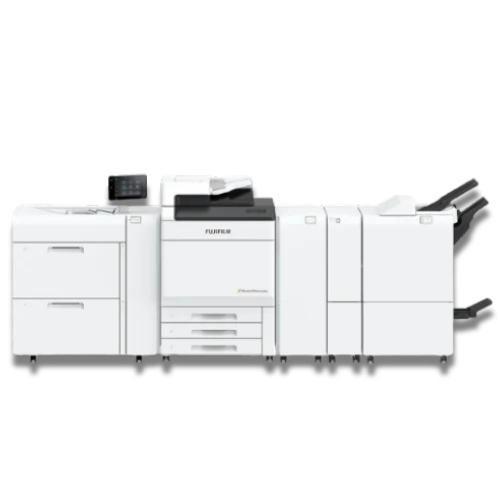









Fujifilm Revoria Press SC285 colour production printer with gold, silver and clear specialty toner for short run print

Fujifilm Revoria SC285 / S

Colour Production Press with 5th colour option

Features at a glance

Revoria SC285 for gold, silver and clear effects

A dual-role colour press adding gold, silver or clear toner to CMYK, with full office copy and scan built in.
The Fujifilm Revoria Press SC285 is a dual-role colour production press that combines high-end CMYK+ specialty printing with full office MFP functionality, suiting In-House Marketing teams, Creative Departments, and Small Print Rooms that need both production output and everyday copy/scan in one unit. Running at 85 ppm on A4 and 47 ppm on A3, the SC285 supports one specialty toner station alongside CMYK, with choices of gold, silver, clear, pink, custom red, and textured paper toner.
A duplex automatic document feeder enables 1-pass 2-sided scanning at 270 ppm, with scan-to-folder, scan-to-USB, scan-to-PC, scan-to-email, and job flow support. LED printhead technology delivers 2400 x 2400 dpi, and the press handles stocks from 64 to 256 gsm on trays 1-3 (52 gsm to 300 gsm bypass), sizes from 90 x 146 mm to 330 x 660 mm, and optional banner sheets up to 330 x 1300 mm. Inline finishing covers stapling, staple-free staple via Finisher-C5, saddle staple, hole punch, single fold, tri-fold, Z-fold, crease, two-sided trim, square back, and full-bleed trim.

Product Features

  • A Fifth Toner Station For Specialty Effects
    CMYK plus one specialty station running gold, silver, clear, pink, custom red or textured paper toner. Metallic accents, spot gloss and highlight colour are produced inline, on demand, without a foiling bureau and without a minimum order quantity.
  • Production Speed In Colour And Mono
    85 ppm on A4 and 47 ppm on A3, printing and copying at the same rate in colour as in black and white. Colour work carries no speed penalty.
  • 2400 x 2400 dpi LED Printhead
    An LED printhead in place of a conventional laser scanning assembly. Fewer moving parts in the imaging path, and fine detail, small type and gradient work hold their definition at full production speed.
  • Super EA-Eco Toner
    A low-temperature fusing toner with a fine particle size, giving smooth gradation and even solids while drawing less energy through the fuser than conventional toner.
  • Fiery Print Server
    Fiery SC21 or SC22 with a 1200 x 1200 dpi RIP and 3D calibration. Colour is managed at the server rather than corrected at the machine, and repeat jobs come back matching the first run.
  • G7-Certified Calibration
    G7 calibration with Revoria Flow print servers, which is the reference point most brand guidelines and print buyers work to. Output can be proven against a standard rather than judged by eye.
  • Colour Matching From A Printed Sample
    Scan an existing printed sample and the device matches to it. Reprints of legacy material sit alongside the original without a colour reference file or a manual profiling exercise.
  • AI Correction During The Run
    Scene detection analyses image content and applies correction in real time as the job prints, so quality is held across a long run rather than drifting from the first sheet to the last.
  • Inline Image Inspection
    The optional Smart Monitoring Gate D1, available with Revoria Flow, inspects printed sheets on the line. Defects are caught during production rather than at the packing table.
  • 52 To 400 gsm Media Range
    52 to 400 gsm uncoated and 72 to 400 gsm coated. Heavy board, covers and premium stocks run on the same device as everyday work.
  • Textured And Embossed Media
    An intermediate transfer belt allows printing onto textured and embossed stocks, which conventional direct transfer struggles to hold image on. Linen, laid and embossed finishes become viable in-house.
  • Wide Sheet Size Range
    90 x 146 mm through to 330 x 660 mm, with banner printing up to 330 x 1300 mm simplex. Business cards through to long-format posters and shelf strips run on one machine.
  • Paper Capacity To 8950 Sheets
    A 250-sheet bypass as standard, scaling to 8950 sheets with chained air suction feeders and the banner unit. Multiple stocks stay loaded and long runs proceed without an operator standing by.
  • Air Suction Feeding
    Air Suction Feeder C1-DS and C1-DSXL use shuttle head technology to separate each sheet with a small volume of air. Coated stock that tends to stick, textured stock, pre-printed sheets and lightweight paper all feed reliably.
  • Feed Reliability Built In
    Multifeed detection halts the run if two sheets travel together, and the Static Eliminator D1 removes the static build-up that causes sticking on coated and synthetic media. Missing and duplicated pages are caught at the machine.
  • High-Speed Duplex Scanning
    135 ppm one-sided and 270 ppm two-sided in a single pass, in colour and black and white, from the Duplex Automatic Document Feeder. Bulk digitising runs at production pace.
  • Stapling And Staple-Free Binding
    Finisher-C5 includes staple-free stapling, binding sheets by pressure alone so documents go straight to shredding or recycling with no metal to remove. Finisher D6 covers higher capacity stapling.
  • Inline Booklet Production
    Finisher D6 with Booklet Maker saddle stitches and folds on the line, with the Square Back Fold Trimmer D1 squaring the spine so finished booklets read as bound rather than folded.
  • Folding, Creasing, Trimming And Punching
    Folder Unit CD2 and CD3 for Z-fold half sheet and tri-fold, Crease/Two-sided Trimmer D2 for creasing and two-sided trim, and GBC FuturoPunch Pro for inline punching. Mailers, inserts and bound documents finish without a manual stage.
  • High Capacity Stacking
    The High Capacity Stacker A1 holds 5000 sheets, so long runs complete without an operator clearing output.
  • Connects To Third-Party Finishing
    A Transport Module on the High Capacity Stacker A1 links the press to third-party finishing equipment. Existing finishing kit stays in the workflow rather than being replaced alongside the press.
  • Office Functions Alongside Production
    Serverless on-demand print, scan to folder, USB, PC and email, job flow routing, TWAIN scanning and web browser access. The press handles day-to-day office work rather than sitting idle between production runs.

Download Brochure

Customer References

Case Study

Fujifilm SC285 / S Printer Case Study

Explore how Oxbow and FUJIFILM helped Vans Bookbinders CC move beyond the limits of a small office printer to handle larger volumes and specialised paper and colour requirements in-house.

real businesses - real reviews

The trust we have earned

Posted on Google Google
Ernst Seegers profile picture
Ernst Seegers
23 July 2026
Google star 1Google star 2Google star 3Google star 4Google star 5Trustindex verifies that the original source of the review is Google.
Very rarely do you find a person with such diligence, focus and attention to detail as I have from the service rendered by Mr Carlos da Silva.
Posted on Google Google
Emily Pestana profile picture
Emily Pestana
17 July 2026
Google star 1Google star 2Google star 3Google star 4Google star 5Trustindex verifies that the original source of the review is Google.
The service team and support were fantastic in dealing with my machine even though it’s definitely a much older model
Posted on Google Google
Carlitos Da Silva profile picture
Carlitos Da Silva
17 June 2026
Google star 1Google star 2Google star 3Google star 4Google star 5Trustindex verifies that the original source of the review is Google.
Great to see some places still doing honest business. I recently sourced an inverter for my small business from Oxbow and was amazed at how much care and consideration they gave to my purchase. I had a salesperson on site for assessment and within a week had my inverter installed and functioning perfectly. Very impressed with their service and urgency.
Posted on Google Google
Damian profile picture
Damian
5 May 2026
Google star 1Google star 2Google star 3Google star 4Google star 5Trustindex verifies that the original source of the review is Google.
We recently upgraded to a Fujifilm C750 through Oxbow and the improvement in print quality has been noticeable immediately. Their technician handled everything from delivery to network setup and even configured scan-to-email for the whole team. What stood out was how smoothly the transition happened without any downtime.
Posted on Google Google
Eden K profile picture
Eden K
22 April 2026
Google star 1Google star 2Google star 3Google star 4Google star 5Trustindex verifies that the original source of the review is Google.
We chose a Fujifilm device through Oxbow after comparing a few options. Their consultant gave us honest advice based on our usage rather than pushing the most expensive option. The machine has performed well so far. Appreciate the transparency.
Posted on Google Google
Richard Ayim Annor profile picture
Richard Ayim Annor
10 December 2025
Google star 1Google star 2Google star 3Google star 4Google star 5Trustindex verifies that the original source of the review is Google.
Beautiful

Frequently Asked Questions

What is dpi and ppm?

Dots Per Inch (DPI) measures Print Resolution, where higher values produce sharper, more detailed output. This matters more for graphics and marketing material than it does for everyday documents. Pages per minute (PPM) measures output speed under normal working conditions, and selecting outputs that are too slow causes bottlenecks. Oxbow’s team will assess your actual print volumes and output requirements to make sure the device we recommend hits the right benchmarks for your environment, not just on paper, but in practice.

A Printer outputs documents. An MFP Prints, Scans, Copies, and in many cases, Faxes all from one device. For most businesses, the MFP is the practical default: it consolidates hardware, reduces desk footprint, and integrates with cloud storage and document management platforms. Oxbow’s certified specialists can assess your environment and workflows and recommend the right device for your output demands, team size, and budget so you get the capability you need without paying for what you don’t.

A Managed Print Service is a contract arrangement where Oxbow takes full responsibility for your Printing Environment: Hardware, Consumables, Maintenance, and Support, all under one agreement. Instead of reactive repairs and toner orders, everything is monitored and managed proactively. The result is predictable monthly costs and a Printing Environment that runs without requiring internal resources to maintain it.

Yes. In most cases printing from a smartphone or tablet is straightforward, provided your network is configured correctly. When Oxbow installs your device, our technicians will ensure mobile printing is set up and working from day one. And if you run into any issues down the line, our support team is on hand to troubleshoot and get you back up and running quickly.

Your device will display a low toner warning on the control panel, typically showing a percentage remaining. Clients on an MPS contract will have toner automatically reordered. Toner can be easily reordered from our in-house consumables department.

Our dedicated support team will respond to any service queries within a maximum of 4 hours (during office hours), with a technician dispatched instantly should the query require on-site assistance. Just over 10% of queries can be solved remotely, while on-site support averages at 30 to 45 minutes for a complete fix.