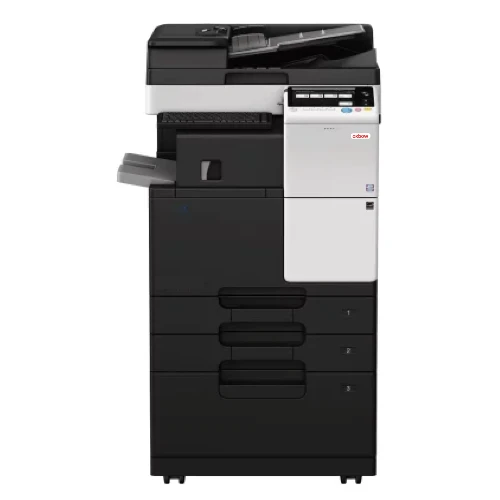
Oxbow B287

Oxbow Monochrome Multifunction Printer

Features at a glance

Best suited for

Office Environments & Home Office

Oxbow B287 for small offices and home businesses

The Oxbow B287 is a compact A3 monochrome multifunction printer built for small offices, home businesses, and satellite branches that need reliable everyday document output without overcommitting on hardware. Running at up to 28 ppm A4 and 14 ppm A3 with colour scanning as standard, the unit handles print, copy, scan, and optional fax in a single device while staying easy to operate and easy to maintain.
Equipped with a 7-inch operation panel and detachable paper cassette for straightforward jam clearance, the B287 is built around a lighter, more compact body than full-feature departmental units. Paper handling starts at 1150 sheets and scales up to 3650 sheets across up to 4 cassettes for businesses with growing volume needs. Mobile printing, NFC pairing for Android, and IC card authentication options make it suitable for offices that want enterprise-grade workflow features in a smaller frame.

Engineers Experience

A small-office A3 mono MFP. An entry-level kit aimed at home offices and very small workgroups. Speed is light, resolution is the lower 600 dpi standard, and the paper handling and finishing are both modest at best. Where it earns a place is on a counter, a reception, a small back-office: somewhere that needs reliable basic copy/print/scan with enterprise-style security and authentication options. Easy to maintain, easy to clear jams, and supported by the same managed-service backbone as heavier kit. A sensible choice for what it is.

Features

  • Print speed: up to 28 ppm A4 / 14 ppm A3
  • Print resolution: 1800 x 600 dpi
  • Scan resolution: 600 dpi (colour scanning)
  • Paper size range: A5 to A3
  • Paper capacity: 1150 sheets standard up to 3650 sheets maximum across up to 4 cassettes
  • 7-inch operation panel
  • Reversing automatic document feeder (optional)
  • Gigabit Ethernet standard; optional Wi-Fi
  • Mobile printing: AirPrint (iOS) Mopria (Android) NFC Authentication and Pairing Google Cloud Print (optional) Wi-Fi Direct (optional)
  • Finishing options (optional): inner staple finisher, staple/booklet finisher, 2/4-hole punch, half-fold, letter fold, booklet
  • Detachable paper cassette for easy jam clearance
  • Security: user authentication, encrypted PDF support, confidential fax receipt, TPM, hard drive overwrite, AES 256 hard drive encryption
  • Authentication options: IC card reader, biometric finger vein scanner
  • Integrated and ready for Oxbow managed service contracts

Case Studies

Frequently Asked Questions

What is dpi and ppm?

Dots Per Inch (DPI) measures Print Resolution, where higher values produce sharper, more detailed output. This matters more for graphics and marketing material than it does for everyday documents. Pages per minute (PPM) measures output speed under normal working conditions, and selecting outputs that are too slow causes bottlenecks. Oxbow’s team will assess your actual print volumes and output requirements to make sure the device we recommend hits the right benchmarks for your environment, not just on paper, but in practice.

A Printer outputs documents. An MFP Prints, Scans, Copies, and in many cases, Faxes all from one device. For most businesses, the MFP is the practical default: it consolidates hardware, reduces desk footprint, and integrates with cloud storage and document management platforms. Oxbow’s certified specialists can assess your environment and workflows and recommend the right device for your output demands, team size, and budget so you get the capability you need without paying for what you don’t.

A Managed Print Service is a contract arrangement where Oxbow takes full responsibility for your Printing Environment: Hardware, Consumables, Maintenance, and Support, all under one agreement. Instead of reactive repairs and toner orders, everything is monitored and managed proactively. The result is predictable monthly costs and a Printing Environment that runs without requiring internal resources to maintain it.

Yes. In most cases printing from a smartphone or tablet is straightforward, provided your network is configured correctly. When Oxbow installs your device, our technicians will ensure mobile printing is set up and working from day one. And if you run into any issues down the line, our support team is on hand to troubleshoot and get you back up and running quickly.

Your device will display a low toner warning on the control panel, typically showing a percentage remaining. Clients on an MPS contract will have toner automatically reordered. Toner can be easily reordered from our in-house consumables department.

Our dedicated support team will respond to any service queries within a maximum of 4 hours (during office hours), with a technician dispatched instantly should the query require on-site assistance. Just over 10% of queries can be solved remotely, while on-site support averages at 30 to 45 minutes for a complete fix.

Oxbow SA is conveniently located at Century Gate Business Park, Block 01, Century City, Cape Town, 7441, serving businesses across Century City, Milnerton, Montague Gardens, and the greater Cape Town area.

connect with the team

Home Page Form
First Name
First Name